Estimate Software for Service Businesses

Win more jobs by letting customers

Send estimates by text or email and give customers a simple way to respond without extra calls, follow-up, or back-and-forth.

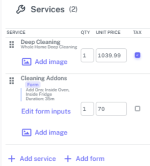
Estimate add-on list showing optional extras and selected services
Estimate builder interface showing services, pricing, and estimate structure
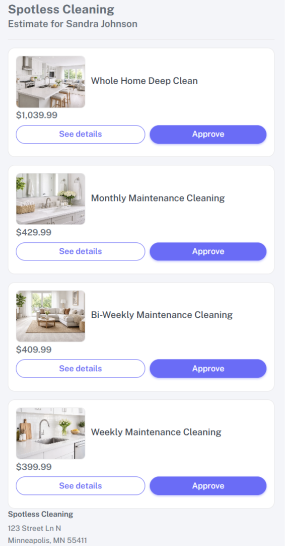
Customer-facing estimate view showing service options, prices, and approval buttons
Estimate sent notification showing text and email delivered
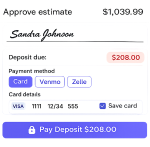
Estimate approval screen showing signature, deposit amount, and payment method options
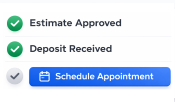
Estimate approved status screen showing customer approval confirmation
Professional Estimate Software

Everything you need to build, send, and approve estimates
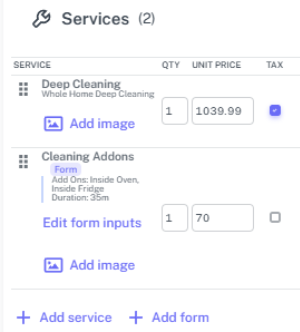
Estimate builder interface showing services, pricing, and estimate structure
Estimate add-on list showing optional extras and selected services
Estimate builder

Create polished estimates faster

Build clear estimates with services, pricing, notes, and optional extras in one place.

  • Add services, notes, and extras in one estimate
  • Keep pricing clear before it reaches the customer
  • Set price and time for each line item so approved work is ready for scheduling
Customer-facing estimate page opened from a text or email
Estimate sent notification
Send estimates

Send estimates that are easy to review

Text or email estimates and give customers a clean online estimate page that is easy to open, review, and respond to.

  • Send by text or email
  • Share a customer-friendly online estimate
  • Automatically include a PDF version that is easy to view offline and print.
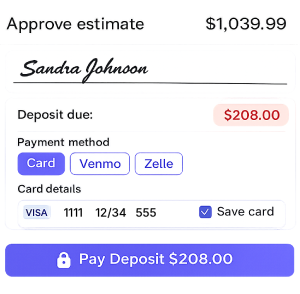
Estimate approval step showing signature capture
Approvals and signatures

Get approvals faster online

Give customers a simple way to review the estimate, sign, and move forward without extra calls or follow-up.

  • Let customers choose the option that fits them best
  • Reduce back-and-forth before booking
  • Make it easier for customers to say yes
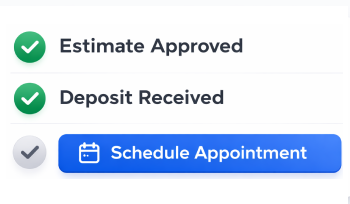
Approved estimate status card showing deposit received
Deposit and signature step with payment options
Deposits

Collect deposits before the job is booked

That means less chasing, clearer commitment, and a smoother path to a booked job.

  • Require a deposit before customers can approve
  • Collect card deposits automatically during approval when card payments are connected
  • Offer other payment options like Venmo or Zelle when needed

Price Book

Services, materials, and price forms
Feeds Estimates
Deep Cleaning Service with linked labor, materials, and duration
$320
Inside Fridge Add-On Optional extra that can be pulled into the estimate
$40
Pricing Form Structured pricing inputs for more consistent estimate building
Ready
Price book

Build from pricing you already use

Use your price book to make estimate building faster and more consistent.

  • Pull services and pricing into estimates
  • Reduce retyping
  • Keep pricing more consistent

Make estimates easier to send, easier to approve, and easier to move into scheduling

Less chasing, less back-and-forth, and a smoother path from estimate to booked job.

THE USUAL WAY

More follow-up after the estimate is sent

WITH SERVICE IN SYNC

Keep the estimate moving toward a booked job

THE USUAL WAYSend a quote and hope you hear back
WITH SERVICE IN SYNCGive customers a clear estimate they can review and approve online
THE USUAL WAYSend one price with little room to compare
WITH SERVICE IN SYNCLet customers compare options and choose what fits them best
THE USUAL WAYChase the signature and deposit separately
WITH SERVICE IN SYNCLet customers approve, sign, and pay in one simple flow
THE USUAL WAYRe-enter the job details again later
WITH SERVICE IN SYNCKeep approved work ready for scheduling

Service In Sync helps businesses send estimates, get approvals, and move work forward faster

Service In Sync is field service software with built-in estimating tools. Businesses can send professional estimates, let customers respond online, request deposits when needed, and keep approved work moving toward scheduling. Because estimates are built into Service In Sync, they work with your pricing, scheduling, and other business tools in one connected system.

  • Send professional estimates by text or email
  • Let customers approve and respond online
  • Request deposits when needed
  • Keep approved work moving toward scheduling

Questions business owners often ask about estimates

Short answers to common questions about estimate software, online approvals, deposits, and sending estimates in Service In Sync.

Yes. Estimates are built into Service In Sync, so they work with your pricing, scheduling, and other tools in one connected system instead of a separate estimate app.
Estimating is built into Service In Sync, so businesses can send estimates, collect approvals and deposits, and keep approved work moving forward without needing a separate estimate tool.
Your business can choose how estimate options are set up. You can send a single-option estimate with approve or decline, multiple options where the customer chooses one, or multiple options where the customer can choose more than one.
Customers can sign the estimate as part of the online approval flow, so the approval step is easier to complete.
You can require a deposit as part of the estimate approval flow, so customers need to complete that step before the estimate option can be approved.
Businesses can accept card payments when card processing is connected, and can also use other payment methods like Venmo or Zelle if desired.
If a card deposit is required as part of estimate approval, the approval will not go through unless the card payment is successfully completed. The customer can try again or use another allowed payment option if one is available.
Estimates can be sent by text or email, and customers can open the estimate online to review the details and respond.
Online estimates automatically include an estimate PDF that can be viewed offline, printed, or used when a business wants to send estimates in a more traditional way.
You can build custom line items, include materials, and apply markup rules so estimates match the work and pricing you want to send.
Businesses can use saved pricing tools like a price book to build estimates faster and keep pricing more consistent.
After an estimate is approved, the business can keep the approved work moving forward, including deposit handling and getting the job ready for scheduling.
READY TO SEND BETTER ESTIMATES

Start sending estimates customers can approve online

Create, send, approve, and manage estimates in one place with Service In Sync.

Text or email delivery Online approvals Deposits when needed

Built for service businesses that want faster approvals and less follow-up.